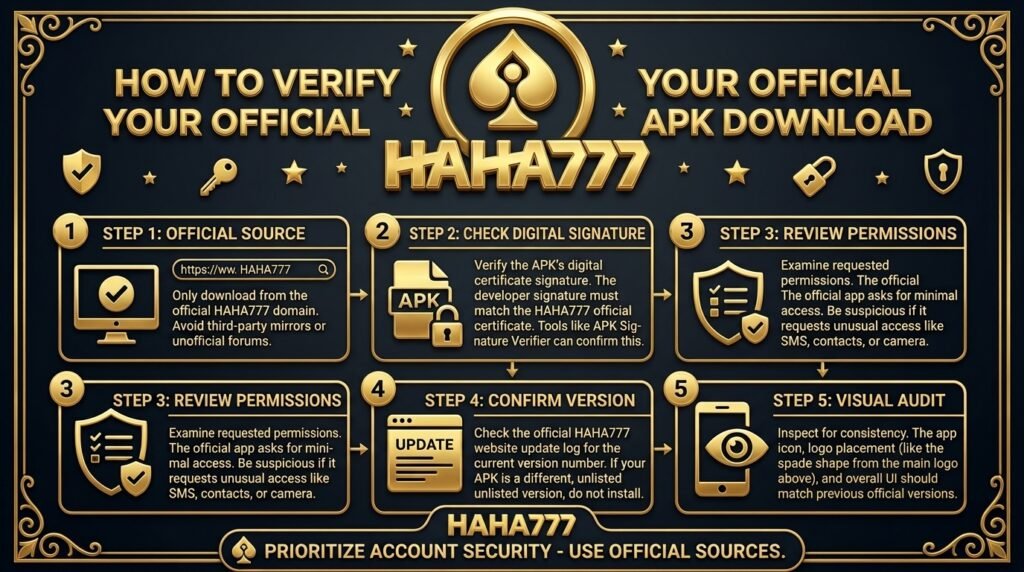
If you’re searching for a HAHA777 APK download, don’t rush into the first link you find. APK files are easy to share, which also means fake or modified versions sometimes get passed around through random websites, social pages, and chat groups.
I’ve downloaded plenty of Android apps over the years, and checking the source has always been my first step. A few seconds of checking the link is better than installing something you don’t recognize.
Check the Website Address First
Start with the website where the APK comes from. Look closely at the domain name because fake pages often use names that look almost identical to the real one.
One missing letter or strange extension is enough to make me stop. The official website should be your first checkpoint before downloading anything.
And don’t trust a page only because it has the HAHA777 logo. Logos and screenshots are easy to copy.
Watch Out for Shared APK Links
Facebook groups, Messenger chats, Telegram channels, and random download pages often share APK files. That doesn’t mean every file is unsafe, but the source isn’t easy to verify.
I’ve seen people forward APK links with messages like “new version” or “updated app” without knowing where the file came from. So I don’t install those files blindly.
Compare the APK Details
After downloading an APK, check its filename and file size before opening it. A strange filename or a package that looks unrelated to the platform deserves another check.
Android also shows the app name and requested permissions during installation. Read those details instead of pressing install immediately.
Some permissions might make sense for an app, while others might look unrelated. If something feels off, I’d stop there.
Check the Download Page Carefully
A proper download page should explain what you’re downloading and provide clear instructions. If you’re hit with several pop-ups, forced redirects, or multiple fake download buttons, that’s a bad sign.
I haven’t independently verified the current official HAHA777 APK distribution page, so I won’t point you toward a specific APK URL. Always compare the download page with HAHA777’s current official source before installing the file.
Don’t Trust “Latest Version” Claims
A page saying “latest APK” doesn’t prove anything. Anyone uploading a modified file can give it a new version number.
The same goes for attractive download buttons. They don’t prove the file is genuine.
Check Android Security Warnings
Your Android phone might scan an APK before installation or show a warning about an unknown source. Don’t ignore these messages automatically.
Read what Android is telling you. If the warning identifies a security concern, I’d rather delete the file and find a trusted source than take the risk.
For me, that small pause matters. No download is worth compromising a phone.
Keep Your Phone Protected
Before installing an APK, keep Android and your security tools updated. Avoid disabling built-in protections simply because a download page tells you to.
Also, don’t give an unfamiliar app access to contacts, messages, photos, or other personal information without a clear reason. Your phone contains more personal data than your gaming account, so protecting the device matters too.
Kaya, I always check twice before installing an APK from outside an app store.
What I Would Do Before Installing HAHA777
I’d start with the official HAHA777 website, confirm the correct domain, and look for the current Android download instructions. Then I’d compare the APK information with what the official source provides.
After downloading, I’d check the file, scan it, read the Android permissions, and only then decide whether to install it. If the source doesn’t match, I wouldn’t use the file.
HAHA777 APK download searches are easy, but finding a trustworthy file requires more attention. Official source first, APK second is the rule I’d follow — and if I can’t verify the source, I leave the file alone.