Introduction
Presenting a property online requires more than taking a few photographs. Potential buyers, renters, and real estate investors want clear visuals that help them understand a property’s layout, condition, and possibilities. Empty interiors can sometimes make this difficult because viewers may struggle to imagine how furniture would fit or how different areas could be used.
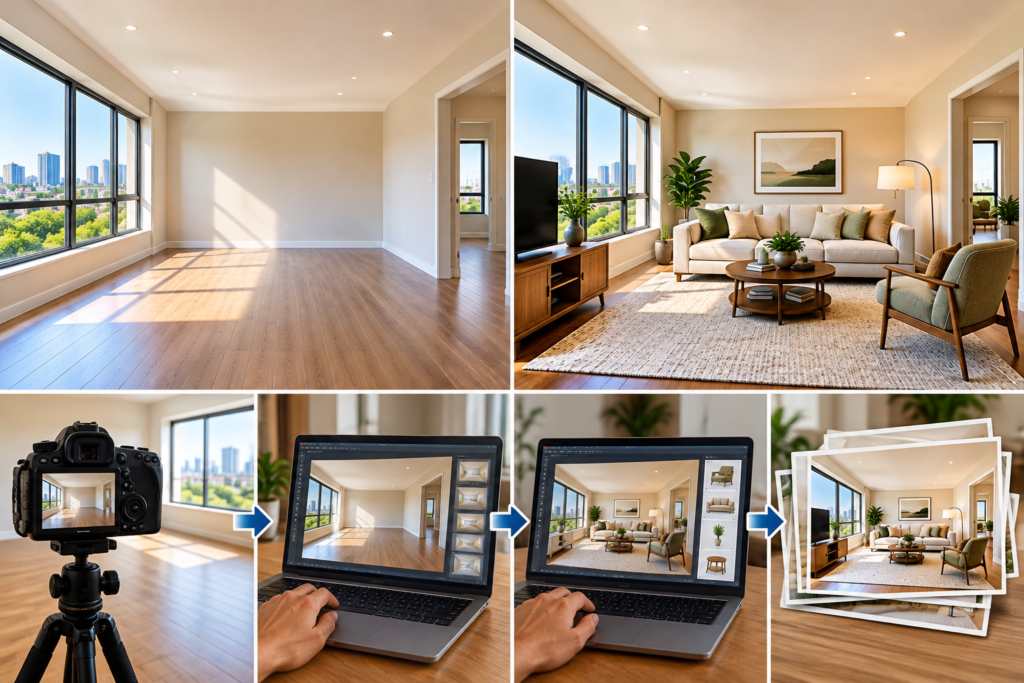
A workable solution to this problem is virtual furniture for empty rooms. By adding realistic digital furnishings to property photographs, real estate professionals can illustrate possible interior arrangements without physically staging a home. However, achieving convincing results requires more than placing a sofa or bed into an image. A structured property image editing workflow helps maintain visual consistency, preserve architectural details, and deliver professional-quality photographs.
Understanding how these processes work together can help property marketers create more useful and appealing listings.
Why Virtual Furniture for Empty Rooms Matters in Real Estate Marketing
Vacant properties often have advantages, including clean surfaces, unobstructed views, and the freedom to imagine different interior styles. Yet an empty room may also appear smaller, less inviting, or more difficult to understand in a photograph.
Virtual staging introduces familiar reference points that help viewers visualize the available space. A digitally added dining table can demonstrate how an open-plan kitchen might accommodate meals, while a furnished bedroom can illustrate practical furniture placement.
Helping Viewers Understand Room Layouts
Furniture provides a useful sense of proportion. When a room contains a realistically sized bed, sofa, or dining table, viewers can more easily estimate how much usable space remains.
For example, a vacant apartment living room might have enough space for a compact sofa, coffee table, and reading chair. A carefully staged photograph can demonstrate this arrangement while preserving visible walkways and access to windows.
The goal is to present a plausible use of the space rather than create an unrealistic interior. Furniture that appears oversized or incorrectly positioned can mislead viewers and reduce confidence in the listing.
Creating Consistent Property Marketing Images
Real estate agencies may advertise several apartments or houses at the same time. Using a consistent visual style across their photographs helps listings look organized and professional.
Neutral furniture, balanced lighting, and coordinated colors can create a cohesive presentation without distracting from the property’s original features. This approach is especially useful when preparing multiple vacant units for online rental platforms or real estate websites.
Building an Effective Property Image Editing Workflow
A reliable property image editing workflow organizes each stage of image preparation, from reviewing the original photographs to checking the final files. A repeatable process helps reduce avoidable corrections and keeps image quality consistent.
Step 1: Review and Prepare Original Photographs
Begin by selecting sharp, well-exposed photographs that clearly show each room. Images with severe distortion, motion blur, or insufficient detail may be difficult to improve convincingly.
Check that walls, windows, doorways, flooring, and permanent fixtures are visible. Correct obvious perspective problems where appropriate, and adjust exposure and white balance without changing the property’s actual appearance.
For example, if a living room photograph looks too yellow because of indoor lighting, a balanced color correction can make the walls appear more natural before digital furniture is introduced.
Step 2: Plan the Furniture Arrangement
Before adding virtual furniture, consider the room’s function, dimensions, and architectural features. A bedroom should have a realistic sleeping arrangement, while a living room may benefit from seating positioned around a natural focal point.
Avoid placing furniture over doors, windows, heating equipment, or built-in storage. Leave enough visible floor space to communicate how people could move through the room.
Planning these details early helps prevent repeated editing and supports a more believable final image.
Step 3: Add Digital Furniture and Match the Lighting
The next stage involves placing suitable furniture into the photograph and adjusting its appearance to match the original environment.
Realistic virtual staging depends on perspective, scale, shadows, and lighting directionWhen a sofa is positioned close to a window, it should react visually to the light coming in. Furniture legs should meet the floor naturally, and objects should not appear to float above surfaces.
Texture and color also matter. A digitally added wooden table should have appropriate surface detail, while fabric furniture should look consistent with the photograph’s lighting and resolution.
Step 4: Review the Image for Accuracy
After staging, inspect the photograph at both normal viewing size and closer magnification. Look for unnatural shadows, inconsistent edges, distorted furniture, or objects that overlap architectural features incorrectly.
Compare the edited image with the original to confirm that permanent features remain unchanged. Any corrections should improve presentation without concealing damage or misrepresenting the property’s condition.
Step 5: Export and Organize the Final Files
Prepare the completed images according to the requirements of the intended listing platform. Use suitable image dimensions, clear filenames, and consistent file formats.
Keep original photographs separate from edited versions so the team can make future revisions without repeating the entire process. A simple folder structure organized by property address, room, and editing stage can also make large image collections easier to manage.
Common Challenges and How to Avoid Them
Even a carefully planned workflow can produce disappointing results if important details are overlooked.
One common issue is incorrect furniture scale. A large sectional sofa may look attractive but could imply that a narrow room offers more space than it actually does. Choosing appropriately sized pieces creates a more trustworthy representation.
Another challenge is inconsistent lighting. Digital objects that are brighter or darker than their surroundings may look artificial.The furniture is more integrated into the scene when the color temperature, contrast, and shadow direction are all matched.
Overediting is another concern. Removing permanent fixtures, altering window sizes, or digitally hiding visible property defects can create misleading expectations. Editing should focus on improving image clarity and illustrating possible furnishing arrangements while maintaining an accurate representation.
For professionals refining their process, resources and services focused on virtual furniture for empty rooms can help illustrate how digital staging fits into broader property photography and image preparation practices. Evaluate any service by reviewing realistic examples, image quality, and its approach to preserving original property details.
Conclusion
Virtual furniture for empty rooms can make vacant interiors easier to understand and more visually engaging for prospective renters and buyers. However, successful results depend on a disciplined property image editing workflow that combines suitable original photography, thoughtful furniture selection, realistic lighting, and careful quality control.
By following consistent editing stages and prioritizing accurate representation, real estate professionals can prepare polished property images that communicate a home’s potential without creating misleading expectations. The result is a more organized marketing process and a clearer visual experience for people evaluating properties online.