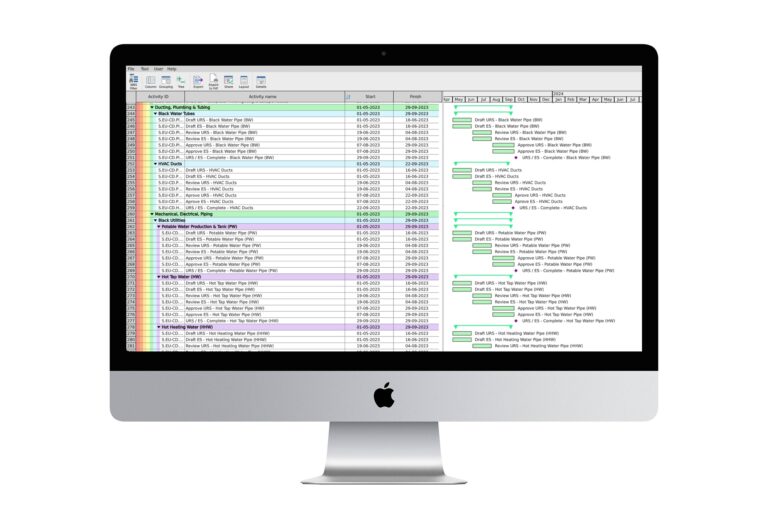
Hey there! If you’re in the world of project management, you’ve probably heard about Primavera Scheduling Software. It’s one of the top project management scheduling tools out there. But here’s the thing: managing complex schedules can get tricky. That’s where XER Reader comes into play. I’ve noticed that more and more project managers, like myself, rely on XER Reader to simplify their work with Primavera. But why is that? What makes XER Reader so essential?
In this post, we’re diving into the reasons behind this combination. We’ll explore how XER Reader enhances the Primavera Project Planner experience. Whether you’re a seasoned pro or just starting out, understanding this tool can make your job a whole lot easier. Let’s break it down, one section at a time.
What is XER Reader?
XER Reader is a nifty tool designed to view and analyze XER files. These files are a format used by Primavera P6 Scheduling software. Now, if you’re scratching your head about what XER files are, let’s clear that up. They contain project data like activities, resources, and schedules. Think of them as a snapshot of your project details.
Here’s a real-world example: Imagine you’re managing a construction project. You need to keep track of timelines, materials, and labor. XER Reader lets you view this data without altering the original file. It’s like having a read-only window into your project’s soul.
Pro Tip: Use XER Reader for quick project reviews during meetings. It saves time and prevents accidental data changes.
Now, let’s look at the pros and cons. On the plus side, XER Reader is user-friendly and doesn’t require a Primavera license. It’s also lightweight and fast. However, it doesn’t allow you to edit XER files or create new ones. But for viewing and analyzing, it’s a champ!
Understanding Primavera Scheduling Software
Primavera Scheduling Software is a powerful project management tool. It’s widely used in industries like construction, engineering, and IT. Why? Because it helps manage complex projects with ease. Primavera P6 Scheduling, in particular, is known for its robust capabilities.
Let’s say you’re planning a large-scale infrastructure project. You need to coordinate multiple teams and resources. Primavera helps you create detailed schedules and track progress. It’s like having a supercharged planner at your fingertips.
Pro Tip: Customize Primavera’s dashboards to highlight critical project areas. It helps you focus on what matters most.
But, there are pros and cons. The software is feature-rich and can handle complex tasks. However, it comes with a steep learning curve and can be expensive. That’s why many teams use it alongside tools like XER Reader for a more balanced approach.
How XER Reader Works with Primavera
So, how does XER Reader fit into the Primavera ecosystem? It acts as a supporting tool. While Primavera handles the heavy lifting, XER Reader gives you a quick glance at your data. It’s like having a window into your project without opening the door.
Imagine you’re in a meeting, and you need to show progress updates. Instead of firing up Primavera, you can use XER Reader. It’s fast and keeps things simple.
Pro Tip: Combine XER Reader with other reporting tools for comprehensive project insights.
Pros and cons? Well, XER Reader is great for viewing data quickly. But, it doesn’t allow edits or updates. Still, it complements Primavera perfectly by offering a streamlined view of your projects.
Benefits of Using XER Reader
There are several benefits to using XER Reader with Primavera. First, it saves time. You don’t need to open complex software just to check a few details. It’s also cost-effective since you don’t need multiple Primavera licenses.
Here’s a scenario: You’re a project manager with a tight schedule. You need to review project timelines on the go. XER Reader lets you do just that without any fuss.
Pro Tip: Use XER Reader on a tablet for easy access during site visits.
As for pros and cons, the main advantage is convenience. It’s easy to use and doesn’t strain your resources. However, it lacks editing features. But as a viewing tool, it shines bright.
Real-world Application of XER Reader
Let’s talk about real-world applications. In large projects, every minute counts. XER Reader speeds up data access, which is crucial. I’ve seen teams use it to quickly verify schedules during tight deadlines.
Consider a manufacturing project. Managers need to ensure production timelines are met. XER Reader helps them monitor these timelines efficiently without disrupting the workflow.
Pro Tip: Integrate XER Reader with cloud storage for remote access to project files.
Pros? It enhances team collaboration by providing a unified view of data. Cons? Limited to viewing. However, when combined with other tools, its utility is unmatched.
Challenges When Using XER Reader
Of course, no tool is perfect. XER Reader has its challenges. For one, it’s strictly a viewer. You can’t make any edits. This means you’ll always need additional software for updates.
Picture this: You’re at a project meeting, and a quick change is needed. You’ll have to switch back to Primavera for any edits. It’s not a deal-breaker, but something to consider.
Pro Tip: Keep a copy of your projects in both XER format and editable versions to avoid switching back and forth.
Pros? It’s lightweight and fast. Cons? Editing limitations. But if you’re aware of these, you can plan accordingly and make the most of its capabilities.
Tips for Optimizing XER Reader Use
Here are some tips to get the best out of XER Reader. First, familiarize yourself with its interface. The quicker you can navigate, the more efficient you’ll be. Also, maintain a clean file structure for easy access.
Imagine you’re managing multiple projects. A well-organized file system saves you loads of time. You can find and open files without hassle.
Pro Tip: Regularly update your file index to keep track of all project versions.
Pros? Enhanced efficiency and ease of use. Cons? Requires initial setup time. But once set, you’re golden.
Alternatives to XER Reader
While XER Reader is great, it’s good to know your options. There are alternatives like Primavera Viewer and ScheduleReader. Each comes with its own set of features and limitations.
Consider a scenario where you need both viewing and editing capabilities. ScheduleReader might be a better fit. But, if you’re after simplicity, XER Reader is tough to beat.
Pro Tip: Evaluate your project needs before deciding on a tool. Sometimes a combination works best.
Pros? Variety of features. Cons? Some alternatives can be costly or complex. However, understanding these options lets you choose the right tool for your needs.
Conclusion: The Power of XER Reader with Primavera
Honestly, combining XER Reader with Primavera Scheduling Software is a smart move. It’s like having a dynamic duo for project management. XER Reader simplifies data access, while Primavera offers robust scheduling.
Picture this: You’re leading a critical project and need quick data insights. XER Reader provides that, saving you time and effort. It’s a tool I’ve come to rely on for effective project management.
Pro Tip: Regularly review your toolset to ensure it aligns with project goals.
Pros? Streamlined workflow and improved efficiency. Cons? Limited to viewing. But when used right, XER Reader can be your secret weapon in project management.
Frequently Asked Questions
What is the primary function of XER Reader?
XER Reader allows users to view and analyze XER files from Primavera Scheduling Software without making changes to the data.
Can I edit XER files with XER Reader?
No, XER Reader is strictly for viewing and analysis. You’ll need other software to edit XER files.
Is XER Reader compatible with all versions of Primavera?
Yes, XER Reader is designed to work with various versions of Primavera Scheduling Software.
Are there any costs associated with XER Reader?
XER Reader is typically a cost-effective solution as it doesn’t require a Primavera license for viewing files.
How does XER Reader enhance project management?
It provides quick access to project data, enhancing efficiency and allowing for informed decision-making without altering data.
Why not give XER Reader a try in your next project? Share your thoughts or experiences with us. We’d love to hear how it works for you!