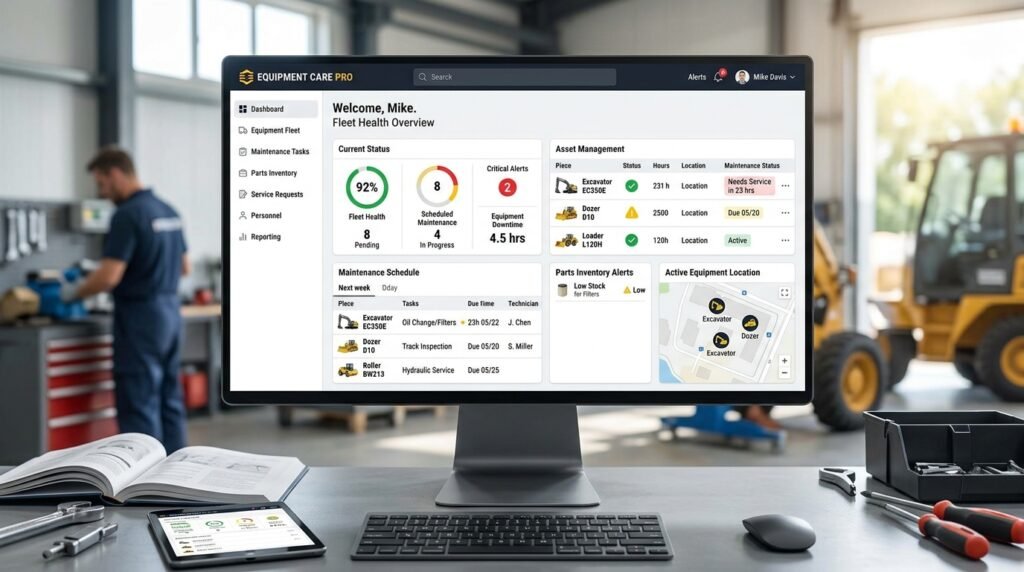
Heavy equipment repair software helps construction companies, equipment rental businesses, industrial facilities, and heavy equipment repair shops manage repair jobs, organize work orders, track parts, and maintain accurate service records. From diagnosing mechanical problems to coordinating technicians and monitoring repair costs, this software helps businesses streamline repair operations and reduce equipment downtime.
As businesses depend on excavators, bulldozers, cranes, loaders, and other heavy machinery, efficient repair management becomes increasingly important. Delayed repairs, missing parts, incomplete service records, and poor communication can affect productivity and increase operating expenses. A centralized repair management system helps businesses organize these activities and keep equipment moving.
What Is Heavy Equipment Repair Software?
Heavy equipment repair software is a digital solution designed to manage repair jobs, service requests, work orders, technician assignments, parts usage, and equipment repair histories. It helps repair shops and fleet maintenance teams coordinate repair activities from the initial problem report to job completion.
Traditional repair management often relies on paper records, spreadsheets, phone calls, and manual scheduling. These methods can make it difficult to track repair progress, estimate job costs, manage parts availability, and communicate with customers or equipment operators.
Heavy equipment repair software brings these processes into one system. Depending on the platform, it may include customer management, repair estimates, labor tracking, inventory management, digital inspections, invoicing, and maintenance scheduling.
By centralizing repair information, businesses can improve workflow visibility, maintain consistent records, and make better decisions about equipment servicing.
Why Is Heavy Equipment Repair Software Important?
Heavy machinery operates in demanding environments where mechanical wear, hydraulic failures, electrical problems, and damaged components can interrupt operations. Without an organized repair process, even a relatively minor issue can lead to extended downtime.
Heavy equipment repair software helps businesses manage repair activities more systematically and respond to equipment problems efficiently.
1. Reduce Equipment Downtime
Unexpected equipment failures can delay construction projects, interrupt rental operations, and reduce productivity. Repair management software helps teams record reported issues, prioritize urgent jobs, assign technicians, and monitor repair progress.
For example, when an excavator develops a hydraulic leak, the maintenance manager can create a work order, assign a technician, identify required replacement parts, and track the repair until the machine is ready for operation.
2. Improve Repair Job Management
Managing several repair jobs simultaneously can become complicated, especially when technicians work across multiple locations. Repair software provides a centralized view of active work orders, pending jobs, assigned technicians, and completed repairs.
This visibility helps managers allocate workloads, identify delays, and keep repair activities organized.
3. Track Repair Costs
Heavy equipment repairs can involve expensive components, specialized labor, transportation, and external service providers. Without accurate records, businesses may struggle to determine the actual cost of repairing individual machines.
Repair software can record labor hours, parts expenses, service charges, and other job-related costs. These records help businesses evaluate repair spending and identify equipment that repeatedly requires expensive work.
4. Improve Equipment Reliability
Although repair software cannot prevent every mechanical failure, it helps businesses maintain accurate repair histories and identify recurring problems.
By reviewing previous repairs, technicians can investigate repeated hydraulic issues, engine problems, electrical faults, and component failures. Combining repair tracking with preventive maintenance can help businesses address underlying problems more effectively.
5. Improve Workplace Safety
Faulty brakes, damaged hydraulic hoses, worn tires, and malfunctioning safety systems can create serious workplace hazards.
Digital repair records and inspection checklists help teams document equipment defects, assign corrective work, and verify that required repairs have been completed before machinery returns to service.
Key Features of Heavy Equipment Repair Software
The best repair management solution should support the daily requirements of heavy equipment repair shops, construction fleets, rental companies, and industrial maintenance teams.
1. Repair Work Order Management
Work order management is one of the most important features of heavy equipment repair software. It allows teams to create repair jobs, describe reported problems, assign technicians, record labor, and monitor progress.
Each work order may include equipment identification, customer information, fault descriptions, repair instructions, required parts, labor estimates, and completion notes.
For example, if a bulldozer develops an engine overheating problem, a technician can document the symptoms, inspect the machine, record the diagnosis, and update the work order as repairs progress.
2. Equipment Repair History Tracking
A complete repair history helps technicians understand previous mechanical problems and identify recurring faults.
The software can store details of completed repairs, replaced components, inspection findings, technician notes, and service dates. These records can help businesses investigate repeat failures, evaluate equipment condition, and support warranty-related documentation.
Accurate histories are particularly valuable for businesses managing large fleets or repairing machinery for multiple customers.
3. Parts and Inventory Management
Heavy equipment repairs often require specialized components, including hydraulic pumps, hoses, filters, bearings, belts, seals, and engine parts. If the necessary components are unavailable, repair jobs may remain incomplete.
Inventory management features help businesses monitor stock levels, record parts used on individual jobs, establish reorder points, and identify frequently used components.
Connecting inventory records with repair work orders also makes it easier to calculate parts costs and understand which equipment requires particular components.
4. Technician Scheduling and Labor Tracking
Repair managers need to coordinate technicians according to their availability, skills, and workload. Scheduling tools help assign jobs, organize repair priorities, and monitor job status.
Labor tracking allows businesses to record the time spent diagnosing problems, performing repairs, and testing equipment. This information supports more accurate job costing, productivity analysis, and repair estimates.
5. Repair Estimates and Invoicing
For independent repair shops and service providers, preparing estimates and generating invoices are essential parts of the repair process.
Depending on the platform, repair software may help businesses document expected labor and parts costs, prepare customer estimates, track approval status, and generate invoices after work is completed.
These capabilities can improve billing accuracy and make it easier to communicate repair costs to customers.
6. Mobile Access and Digital Inspections
Heavy equipment is often located at construction sites, rental yards, industrial facilities, or remote work locations. Mobile-friendly repair software allows technicians to access work orders, update repair notes, upload photographs, and record inspection results in the field.
Digital inspection forms also help teams document defects and create follow-up repair jobs when equipment requires additional attention.
7. Repair Cost and Performance Reporting
Reporting tools help businesses analyze repair expenses, job completion times, technician workloads, parts consumption, and equipment downtime.
These reports can reveal which machines require frequent repairs, which jobs are taking longer than expected, and where operational improvements may be possible.
Popular Heavy Equipment Repair Software Options
Several software platforms offer capabilities that may support equipment repair, fleet maintenance, or service management. Their suitability depends on whether a business primarily repairs customer-owned machinery, manages its own fleet, or operates a combination of both.
Fullbay
Fullbay is a software platform focused on heavy-duty repair shops. It helps commercial repair businesses organize shop workflows, manage repair orders, track parts and labor, and handle service-related administrative tasks.
For heavy equipment repair businesses that also service trucks, trailers, and other heavy-duty vehicles, Fullbay may be worth evaluating. Businesses should confirm that its features match their particular machinery types, customer workflows, and operational requirements.
Fleetio
Fleetio is a fleet management platform with maintenance management capabilities. It helps businesses track vehicles and equipment, organize maintenance activities, manage service records, and monitor fleet-related expenses.
Fleetio may be suitable for organizations that primarily need centralized fleet maintenance visibility rather than a specialized repair-shop management system. Companies should review its current features to determine whether they meet their repair order, inventory, and technician workflow requirements.
ManagerPlus
ManagerPlus is an asset and maintenance management software solution designed to help organizations manage equipment, maintenance schedules, work orders, and asset-related information.
Businesses maintaining construction machinery, industrial assets, or equipment across multiple locations may consider ManagerPlus when evaluating systems for organizing maintenance and repair activities. The appropriate configuration will depend on the organization’s workflow and reporting needs.
Before selecting any platform, compare supported equipment types, work order capabilities, parts management, pricing, integrations, mobile access, and customer support. A product demonstration based on real repair scenarios can help establish whether the software is suitable for your business.
How Heavy Equipment Repair Software Works
Most repair management systems follow a workflow that connects equipment information, reported problems, repair activities, and final documentation.
Step 1: Register equipment and customers. Create records containing equipment identification numbers, make, model, ownership details, operating hours, and relevant customer information.
Step 2: Record the repair request. Document the reported problem, inspection findings, fault codes, photographs, and any initial diagnostic information.
Step 3: Create a repair work order. Define the required work, assign priorities, estimate labor and parts, and establish the next steps.
Step 4: Assign technicians and parts. Allocate the repair to suitable technicians and confirm the availability of necessary components, tools, and equipment.
Step 5: Perform and document the repair. Record diagnostic findings, labor hours, parts used, additional problems discovered, and any required testing.
Step 6: Complete the job and update records. Document the repair outcome, update equipment history, prepare the invoice where applicable, and close the work order.
Step 7: Review reports and recurring issues. Analyze repair costs, downtime, repeated failures, and job completion times to identify opportunities for improvement.
This process creates a consistent record of each repair and helps managers understand the status of equipment and ongoing jobs.
Benefits for Construction Companies and Heavy Equipment Repair Shops
Heavy equipment repair software can support several types of businesses, although the most valuable features vary by operation.
Construction Companies
Construction companies can use repair management tools to coordinate equipment repairs, prioritize machines needed for upcoming projects, track service expenses, and maintain repair histories across job sites.
Centralized records help managers understand which equipment is unavailable and organize repair activities around operational priorities.
Equipment Rental Businesses
Rental companies need to inspect equipment between rentals and address reported defects promptly. Repair software can help track damage reports, organize workshop jobs, record parts used, and document when a machine is ready for its next rental.
These records also help teams coordinate repairs across rental locations and service facilities.
Independent Heavy Equipment Repair Shops
Repair shops benefit from tools that organize customer equipment, repair estimates, work orders, technician assignments, parts usage, and billing.
A centralized system can make it easier to monitor multiple customer jobs, communicate repair progress, and maintain accurate records of completed work.
Industrial Facilities
Industrial facilities may use repair software to coordinate equipment repairs, document mechanical failures, assign maintenance personnel, and track repair-related expenses.
When combined with preventive maintenance planning, these capabilities can support more consistent equipment management.
How to Choose the Right Heavy Equipment Repair Software
Choosing the right platform begins with understanding your repair workflow, equipment types, and operational priorities.
Before comparing products, identify whether you need software primarily for an independent repair shop, an internal maintenance department, a rental fleet, or a business that repairs customer equipment and manages its own machinery.
Evaluate the following capabilities:
- Equipment tracking: Maintain accurate records for every machine and component.
- Repair work orders: Create, assign, prioritize, and close repair jobs.
- Parts inventory: Monitor stock levels and connect parts usage to repair jobs.
- Labor tracking: Record technician hours and calculate repair costs.
- Customer management: Maintain customer equipment records, estimates, and service histories where applicable.
- Mobile accessibility: Allow field technicians to access repair information and update jobs remotely.
- Reporting: Review repair expenses, downtime, recurring failures, and job performance.
- Preventive maintenance: Schedule recurring service tasks alongside corrective repairs.
- Integration options: Connect accounting, purchasing, inventory, or fleet management systems where needed.
- Scalability: Support additional technicians, equipment, customers, and locations as the business grows.
Also consider implementation costs, subscription fees, training requirements, data migration, user permissions, and customer support.
A practical way to compare software is to test the same example repair in each shortlisted system. For instance, create a hydraulic pump repair job, assign a technician, reserve parts, record labor, and generate a final service report. This makes it easier to identify which platform fits your actual workflow.
Common Problems Heavy Equipment Repair Software Can Solve
As repair operations expand, businesses often encounter recurring administrative and operational challenges.
- Delayed repairs: Work order tracking helps managers identify pending jobs and prioritize urgent equipment problems.
- Missing repair records: Centralized equipment histories make previous diagnoses and completed repairs easier to retrieve.
- Parts shortages: Inventory monitoring improves visibility into available components and upcoming purchasing needs.
- Unclear repair costs: Labor and parts tracking helps businesses calculate job expenses more accurately.
- Technician scheduling conflicts: Assignment and workload visibility help managers coordinate repair activities.
- Repeated equipment failures: Historical repair data helps technicians investigate recurring problems.
- Communication gaps: Shared work order updates help managers, technicians, and service coordinators stay informed.
- Limited performance visibility: Reporting tools help identify equipment with high repair costs or extended downtime.
Software cannot eliminate all mechanical failures, but it can help businesses organize repair work, improve documentation, and respond to problems more consistently.
The Future of Heavy Equipment Repair Software
Heavy equipment repair management is increasingly influenced by telematics, connected machinery, mobile applications, and data-driven diagnostics.
Some platforms can integrate equipment operating hours, engine fault codes, sensor readings, or telematics information into maintenance workflows. This information can help technicians investigate problems and identify service requirements more quickly.
Predictive maintenance tools may also help businesses recognize patterns that indicate potential component failure. However, these capabilities depend on the machinery, available sensors, data quality, integrations, and software functionality.
Mobile technology is another important development. Field technicians can access repair instructions, upload diagnostic photographs, record parts usage, and update work orders without returning to the office.
As these tools develop, businesses may gain better visibility into equipment condition, repair priorities, and operational costs.
Conclusion
Heavy equipment repair software helps construction companies, rental businesses, industrial facilities, and repair shops manage work orders, coordinate technicians, track parts, document repairs, and monitor service expenses.
Platforms such as Fullbay, Fleetio, and ManagerPlus offer different approaches to repair, fleet, and maintenance management. The right choice depends on your business model, equipment requirements, and the level of repair-shop functionality you need.
By replacing fragmented records with a centralized digital workflow, businesses can improve repair coordination, maintain accurate service histories, and make more informed decisions about equipment spending.
Whether you operate an independent heavy equipment repair shop or manage machinery across multiple job sites, selecting software that matches your daily workflow can help your team work more efficiently and keep essential equipment in service.